howto Ninja Ripper2/Anime Studio

K

Kennet

New member
Joined
May 19, 2026
Messages
5
Reaction score
3
Points
3
Credits
80
Hi I am currently trying to learn how to use either of those tools to extract usable characters from games. I got Ninja Ripper kind of working but I was not happy with the result. I do know my way around Blender(mostly modeling) so ultimately I wanted create some models for some characters that don't have 3d models, but beforehand I wanted to try out the KK implementation pipeline. So I wanted to Rip a model before taking the time to make my own, but the documentation of these tools are lacking to say the least.
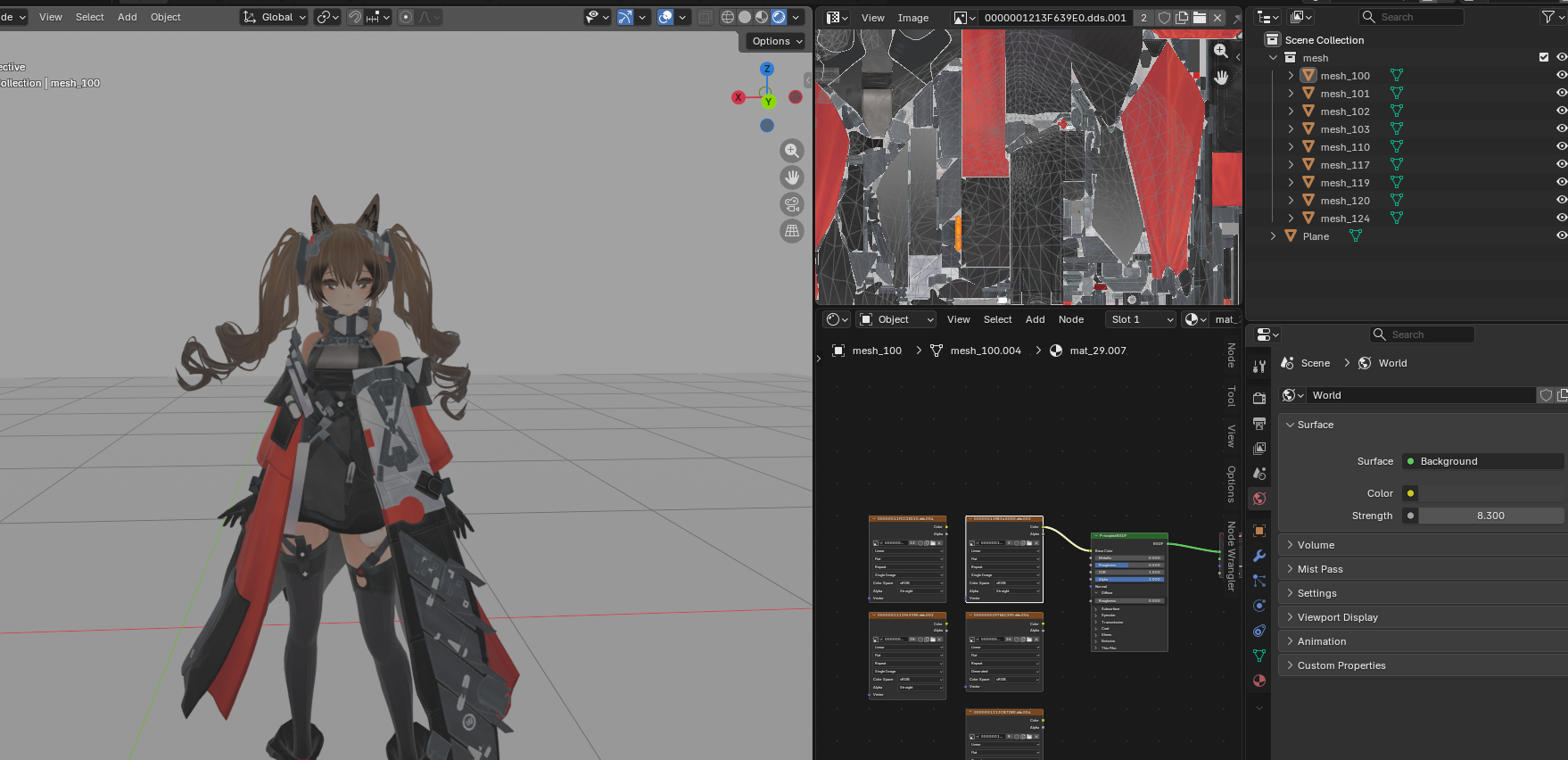
But nevertheless I tried to get a character model out of Arknights Endfield via Ninja Ripper2 after a few hours I kind of got it working but textures where a mess trying to get them to work, and overhaul the whole thing is just confusing. Animestudio on the other hand I never got any files into blender. The whole Documentation on both those tools are def not enough for me to figure out how they are supposed to work without any help.

I'd love to hear anyone's experiences/tip or are willing to help, or if there is a good tutorial/guide out there I'd love directions?
 
Last edited:
K

Kennet

New member
Joined
May 19, 2026
Messages
5
Reaction score
3
Points
3
Credits
80

Ok looking at it now guess I got pretty far with Ninja. But still dont think I did it as intended as it was quite a hassle to figure out.
Also dont think I got all the textures right. They are still confusing like every tex exsist 4 times and not sure if I need all the shader/maps.
 
Last edited:
LordBubnub

LordBubnub

KK Master
Joined
Oct 9, 2025
Messages
391
Reaction score
1,212
Points
93
Credits
14,082
Now this is something. Didn't think there would be another person interested in the Blender to KK implementation on this forum.

If you're looking for asset rips, chances are that they are already out there. You'll just need to find them. MMD models are superb and there are a lot of resources out there like these links below:

Sites with MMD Models Downloads
https://bowlroll.net/file/index
https://tstorage.info/users/jam10003


My experience with finding 3D models mostly boils down to Kemono (now dead), Reddit links, official model releases, and YouTube showcases. I have gotten files sources like these then just using them in blender.

Links:

However, If you're planning on doing it yourself by ripping the 3D model then implementing it to KK to become the next Juedge, then yes, there's a way using AnimeStudio. Hypergryph doesn't release official 3D models publicly so this might have better results for you. Quoting their short description (for those who don't know)

"Asset extraction tool for unity games, supports GI 6.0+, HSR 4.0+, ZZZ 2.2+ and many more (*゚∀゚*)"

It also supports asset rips for Endfield. There is Discord and a few guides on how to use it.

Check the pinned messages on the Discord in the Endfield section. It basically lists the important info you need to know. I guess it was hard to follow since it was initially for Hoyogames.

These are my results of extracting Endfield Mifu using AnimeStudio and I got it working in Blender. The only thing is I have no idea how to add textures in blender even though I have the textures for all of it 😅

V79pXJD.png


After installing AnimeStudio, you can basically follow this video which is way better than me explaining while I just give some key differences for Endfield below.
View: https://www.youtube.com/watch?v=cLzMA0YEGhQ


Firstly, the type of game.
UxN9ciS.png


Second, is the file location for the assets for Endfield is in this directory by default.
C:\Program Files\GRYPHLINK\games\EndField Game\Endfield_Data\StreamingAssets\VFS

You'll see a bunch of folders in codes like this which translates to each of the assets in game

49982cJ.png
Y0HuzK8.png


When you get to the timestamp of 3:00 where you click "build both", that's where you pick the directory of what you want to export. If you're just after the character models, you select the folder 7064D8E2. That's where all the character models are.

When you get to loading the assets, it should look something like this.
GpKPhFE.png
m485siK.png


There's also another video, but it's in the Discord. If you go to pinned messages, there will be a short walk-through you can follow.

a8qCmXG.png


Afterwards, my recommendation is to probably get a shader for blender that matches with the Endfield style like this one for example.
View: https://www.youtube.com/watch?v=f0WokBEzua0


Unfortunately, I'm a complete Blender newbie so I have no idea what I'm doing in this rocket ship. I would be making my own mods if I was a master at Blender and Unity 😂 I'd love to hear your updates on the KK implementation, and I can help to the best of my knowledge as I'm also learning how to do it myself.

I'll be watching your career with great interest. Looking forward to what you'll be doing 🤝 no pressure tho hahaha
 
Last edited:

Similar threads

ashura12305
Replies
0
Views
396
ashura12305
ashura12305
DoNotRedeem
Replies
3
Views
667
Anni93
Anni93
S
Replies
2
Views
795
Selfishly-A-Gooner
S
2
Replies
2
Views
380
chibiwandy
chibiwandy
Top
これは閲覧専用の自動翻訳ページです。返信・検索・ログインなどの操作は、オリジナルの英語版サイトへ移動してください。 英語版で開く (Open in English) ×